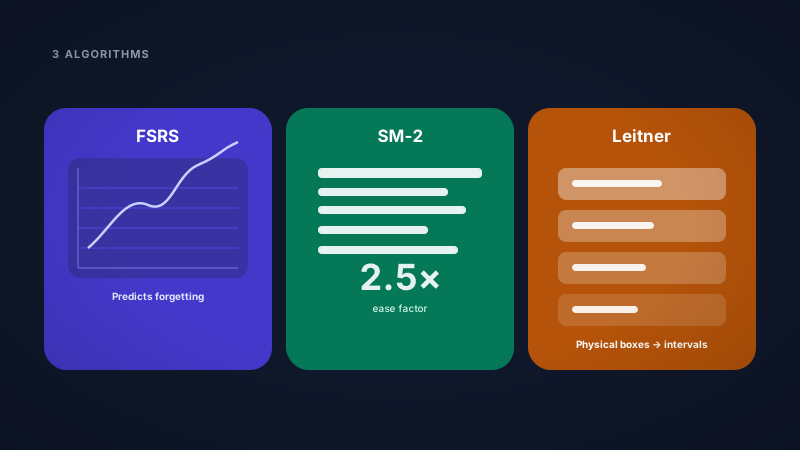
FSRS vs SM-2 vs Leitner: Which Spaced Repetition Algorithm Should You Use?
Compare FSRS, SM-2, and Leitner spaced repetition for students. How each algorithm works, when to pick each one, and how to customize them in Nebulearn.
"Just use spaced repetition" sounds simple until you open settings and see three algorithm names that could be Dungeons & Dragons classes.
I ship all three in Nebulearn because I wanted to compare FSRS, SM-2, and Leitner without installing Anki add-ons or editing config files. This is what each one actually does and when I'd pick it.
FSRS. SM-2. Leitner. They all schedule flashcard reviews. They do it very differently. Picking the wrong one is not catastrophic, but picking the right one for how you study saves real time over a semester.
The short version: Most students should start with FSRS. If you want Anki-classic behavior, use SM-2. If you want predictable, box-based intervals you can explain to a friend in thirty seconds, use Leitner.
Nebulearn ships all three on the free tier. You switch between them in Settings → Study Preferences, and each one has its own customization panel. No add-ons. No exports. No second app.
Related: What is FSRS? · How to study with spaced repetition · How to use flashcards effectively · Nebulearn vs Anki
The three algorithms at a glance
| Algorithm | Best for | How it schedules | Complexity |
|---|---|---|---|
| FSRS | Most students, long-term retention | Predicts when you'll forget using review history | Medium (app handles math) |
| SM-2 | Anki migrants, classic SRS fans | Ease factor multiplies intervals after each rating | Medium |
| Leitner | Beginners, predictable routines | Cards move through numbered boxes with fixed day gaps | Low |
All three implement the same core idea: review right before you forget. The difference is how aggressively they adapt and how transparent the schedule feels.
Leitner System
The Leitner system is the oldest approach on this list and the easiest to understand.
Picture physical boxes. Box 1 is daily. Box 2 is every 3 days. Box 3 is weekly. You get a card right, it moves up a box and waits longer. You get it wrong, it drops back to Box 1.
Pros
- Dead simple mental model. You always know why a card is due.
- Great when you're new to spaced repetition and don't want algorithm black-box anxiety.
- Predictable workload. You can literally count cards per box.
Cons
- Less efficient than FSRS for the same retention target. Intervals are fixed per box, not personalized per card.
- A single mistake sends the card back to the start, which can feel harsh on dense material.
Customization in Nebulearn
In Settings → Study Preferences → Leitner, you can edit:
- Box intervals — the number of days between reviews for each box (default: 1, 3, 7, 14, 30, 60, 120 days)
- Maximum interval — cap how far out any card can be pushed
Want faster early reviews for a cram-heavy exam block? Shrink the first few box intervals. Want a gentler long-term schedule? Stretch boxes 4–7.
SM-2 (SuperMemo 2)
SM-2 is the algorithm behind classic Anki scheduling. It has been the gold standard for decades.
Each card tracks an ease factor — a multiplier that grows or shrinks based on how hard the card felt. Rate a card "Good" and the interval gets longer. Rate it "Again" and it resets with a shorter ease factor.
Pros
- Battle-tested. Millions of Anki users have validated it over years.
- Familiar if you're migrating from Anki's default (pre-FSRS) setup.
- Transparent-ish: ease factor gives you a sense of card difficulty.
Cons
- Less efficient than FSRS for the same retention in most benchmarks.
- Ease factor drift can make "easy" cards balloon to huge intervals while struggling cards pile up.
Customization in Nebulearn
In Settings → Study Preferences → SM-2, you can tune:
- Interval modifier — scale all intervals up or down globally
- Ease bonus — how much "Easy" ratings boost the ease factor
- Hard interval — multiplier when you rate a card Hard
- Lapse interval — what happens when you forget a mature card
- Maximum interval — upper cap on days between reviews
If Anki's default felt too aggressive or too slow, this is where you fix it without leaving Nebulearn.
FSRS (Free Spaced Repetition Scheduler)
FSRS is the modern option. It was built from large datasets of real review logs and uses memory models to predict your personal forgetting curve per card.
Instead of a single ease multiplier, FSRS tracks richer card state and optimizes for a target retention rate — how likely you want to remember a card when it comes due.
Pros
- Best retention per minute studied in most comparisons against SM-2.
- Adapts to your actual performance, not just a global ease number.
- Default recommendation for new Nebulearn users.
Cons
- Harder to explain in one sentence than Leitner.
- More settings if you want to go deep (but defaults work fine).
Customization in Nebulearn
In Settings → Study Preferences → FSRS, you can adjust:
- Desired retention — e.g. 90% means the algorithm schedules reviews so you remember ~90% of due cards (higher = more reviews)
- Maximum interval — cap how long between reviews
- Fuzz — small random jitter so cards don't all pile up on the same day
- Short-term learning — optional mode for cards still in the learning phase
- Learning steps and relearning steps — minute-based intervals before a card graduates to long-term scheduling
This is the same algorithm family serious Anki users install manually. Read more in What is FSRS?.
Which one should you pick?
Pick FSRS if:
- You're starting fresh and want the best retention per study minute.
- You're in a major where courses stack (STEM, nursing, pre-med, law).
- You don't want to think about algorithm theory.
Pick SM-2 if:
- You're coming from classic Anki and want familiar scheduling behavior.
- You already understand ease factors and want to tune them.
- You want a proven, simple mathematical model without FSRS's extra state.
Pick Leitner if:
- You want the simplest possible mental model.
- You're explaining spaced repetition to a study group and need something visual.
- You prefer fixed, predictable intervals you control box-by-box.
You can switch algorithms in Nebulearn at any time in Settings → Study Preferences. Your cards keep their history. You're not locked in on day one.
Can you customize all three in Nebulearn?
Yes. All three algorithms are available on the free tier, and each has a dedicated settings section:
- Open Settings in the app
- Go to Study Preferences
- Select FSRS, SM-2, or Leitner under Learning Algorithm
- Expand that algorithm's settings panel to customize intervals, retention targets, ease behavior, or box schedules
Most students never touch these defaults. FSRS at 90% desired retention works well out of the box. But if you're the person who reads documentation before midterms, Nebulearn gives you the knobs — without making you install add-ons or edit config files like Anki sometimes requires.
FSRS vs SM-2 vs Leitner: quick decision chart
New to spaced repetition?     → Start with FSRS (or Leitner if you want simplicity)
Migrating from classic Anki?  → Try SM-2 first, then compare FSRS
Want full control of intervals? → Leitner box editing
Want best retention/minute?     → FSRS
The algorithm matters less than showing up daily. But if you're running SRS for an entire degree, picking the right scheduler and tuning it once beats fighting a schedule that feels wrong every week.
Nebulearn ships FSRS, SM-2, and Leitner in one place — Anki can too, but often via add-ons and config. Both are valid; the question is how much setup you want.